Webflow SEO Tips: How to Optimise Your Website for Search Engines

Levi Wilson
January 26, 2025
•
5 minute read

Want to attract more organic traffic to your Webflow website? You're in the right place! At Revamp Digital, we know that a beautiful website is only half the battle. The other half? Making sure search engines like Google can find and rank your site. Here's our expert guide to optimising your Webflow website for SEO success:

1. On-Page Optimisation: Laying the Foundation

  • Keyword Research: Start by identifying relevant keywords that your target audience is using to search for businesses like yours. Use tools like Google Keyword Planner, Ahrefs, or Semrush to find high-volume, low-competition keywords.
Semrush SEO keyword research tool
  • Title Tags and Meta Descriptions: Craft compelling title tags (under 60 characters) and meta descriptions (under 160 characters) for each page, incorporating your target keywords naturally. These elements appear in search results and entice users to click.
Basic Webflow SEO fields
  • Heading Structure (H1-H6): Use a clear heading structure to organise your content and make it easier for search engines to understand. Your main heading should be an H1, followed by H2s for subheadings, H3s for sub-subheadings, and so on.
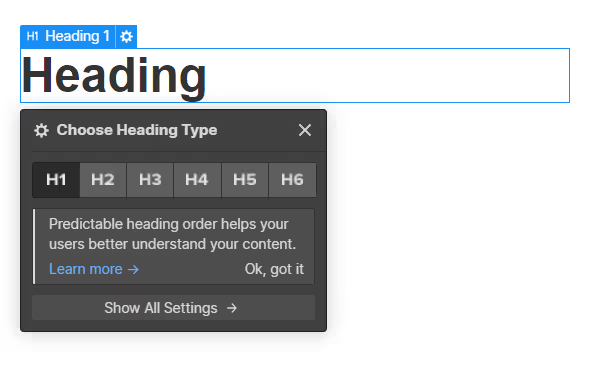
Heading level tab in Webflow
  • Image Optimisation: Optimise your images by using descriptive file names and alt text that includes relevant keywords. This helps search engines understand what your images are about and improves accessibility for visually impaired users.
How to compress CMS assets (To WEBP or AVIF format)
  • Schema Markup: Implement schema markup to help search engines understand the context of your content. This can improve your visibility in search results and enhance your rich snippets. Webflow makes it easy to add schema markup through custom code or integrations.
Visual demonstration of how Schema Markup (Structured Data) is utilised with dynamic (CMS) data in Webflow

2. Content is King: Create Valuable and Engaging Content

  • High-Quality Content:  Create informative, engaging, and well-written content that answers your audience's questions and provides value. This keeps users on your site longer and signals to search engines that your site is a valuable resource.
Visual demonstration of high-quality content in Webflows editor using the CMS
  • Regular Updates:  Keep your website content fresh and updated. Regularly add new blog posts, update existing pages, and refresh images to show search engines that your site is active and relevant.
Visual representation of the publishing process in a team context on Webflow
  • Keyword Optimisation:  Naturally incorporate your target keywords throughout your content, but avoid keyword stuffing, which can harm your rankings.
Semflow SEO tool. A Webflow app we utilise to optimise our websites for SEO

3. Technical SEO: The Behind-the-Scenes Magic

  • Mobile Optimisation: Ensure your Webflow website is responsive and mobile-friendly. Google prioritises mobile-first indexing, so a seamless mobile experience is crucial.
Webflow breakpoints
  • Site Speed: Optimise your website's loading speed by compressing images, minimising code, and leveraging browser caching. Webflow's built-in performance features can help with this. Below is a screenshot of the results we achieved on Inspected Residential's website that we designed and developed!
Results of a PageSpeed audit we ran on a website we designed and developed for Inspected Residential
  • Clean URLs: Use clear and concise URLs that include relevant keywords. This makes it easier for search engines and users to understand what your page is about.
Webflow slug URL field
  • SSL Certificate:  Webflow automatically provides an SSL certificate when you host your website with them, ensuring secure data transmission and boosting your SEO.
How to add SSL certificate to your website when publishing

4. Off-Page Optimisation: Building Authority and Trust

  • Backlinks:  Earn high-quality backlinks from reputable websites in your industry. This signals to search engines that your website is trustworthy and authoritative.
Backlinks visual diagram
  • Social Media:  Promote your website and content on social media platforms to increase visibility and drive traffic.
Use social media to drive traffic to your website!
  • Local SEO (if applicable): If you have a local business, optimise your Google My Business profile and other local directories to improve your visibility in local search results.
Screenshot of Google MyBusiness search results (Local SEO)

Webflow Makes SEO Easy

Webflow's clean code, built-in SEO features, and user-friendly interface make it easier than ever to optimise your website for search engines.  By following these tips and consistently implementing best practices, you can improve your website's visibility, attract more organic traffic, and achieve your business goals.

Need help with your Webflow SEO? Revamp Digital can help! Contact us today, tell us about your project or book a free consultation!

Subscribe to newsletter

Subscribe to receive the latest blog posts to your inbox every week.

By subscribing, you agree to our Privacy Policy and consent to receive updates from our company.
Thank you! We have received your submission.
Oops! Something went wrong. Please try again.
Keep Reading

Related Articles

Check out these related articles for more insights and inspiration.

Web Design
June 8, 2025
5 min read

How to build a website designed for growth

Stop unnecessary website rebuilds. Learn how Webflow helps future-proof your online presence for long-term growth and adaptability, optimising your budget and preventing headaches for your business.
Levi Wilson
Web Design
January 26, 2025
5 min read

5 Essential Elements of a High-Converting Website

Want more leads and sales from your website? This post explores 5 essential elements of a high-converting website, including a clear value proposition, compelling CTAs, user-friendly design, persuasive content, and social proof.
Levi Wilson
Webflow Development
January 26, 2025
5 min read

Top 5 Webflow Features That Will Transform Your Website

Webflow offers powerful features like its visual designer, CMS, interactions, ecommerce capabilities, and a growing app marketplace. These tools allow for creative freedom, easy content management, engaging user experiences, and online selling, making Webflow a top choice for building dynamic and high-performing websites.
Levi Wilson
Web Design
January 26, 2025
5 min read

10 Essential Elements of a High-Converting Website

Discover the key elements that contribute to a high-converting website. From user experience to clear calls to action, this comprehensive guide will help you create a website that drives results.
Levi Wilson
General
January 26, 2025
5 min read

Webflow vs. WordPress: Which Platform Reigns Supreme for Your Business?

Webflow and WordPress are both powerful website platforms, but they cater to different needs. Webflow excels in design flexibility, ease of use, and performance, while WordPress offers extensive customization and a vast community. The best choice depends on your specific business requirements.
Levi Wilson
Web Design
January 26, 2025
5 min read

The Future of Web Design: Trends to Watch in 2025

Explore the exciting future of web design with these key trends to watch in 2025. From AI-powered personalisation and immersive experiences to inclusive design and sustainability, the web is evolving rapidly.
Levi Wilson
General
January 26, 2025
5 min read

Why a Strong Online Presence is Crucial for Kiwi Businesses

A strong online presence is crucial for New Zealand businesses to increase visibility, build credibility, engage customers, and market cost-effectively. This post explores the key elements of a successful online presence and how Revamp Digital can help.
Levi Wilson
Webflow Development
January 26, 2025
5 min read

Why We Choose Webflow for Our Clients (and You Should Too!)

We're passionate about building websites that look amazing and deliver exceptional results. That's why we choose Webflow for our clients. Webflow offers unmatched design flexibility, seamless content management, blazing-fast performance, built-in SEO advantages, future-proof scalability, and client empowerment. Learn more by visiting this blog post!
Levi Wilson
revamp-digital-logo-icon
The Proof is in the Results

What our clients say

Don't just take our word for it – see what our clients have to say about their experience working with Revamp Digital.

google-logo
A digital presence that put us a level up
Websites have been a very difficult place for football clubs to navigate. We wanted a clean, professional digital presence that put us a level up from what you normally see at the grassroots level. Revamp went above and beyond to get this site live in less than eight weeks, meeting our tight deadline over the holiday period. It’s a truly quality website that makes merchandise sales and member sign-ups highly functional, and getting our media team up to speed on the new systems was incredibly easy. Highly recommend Revamp.
Ryan Edwards
Ryan Edwards
South Island United
yellow-email-icon

Email

Have a question or want to discuss your project? Drop us an email, and we'll get back to you ASAP!

yellow-live-chat-icon

Live chat

Need an immediate answer? Connect with our team via live chat for instant support.

yellow-phone-icon

Phone

Prefer to talk? We're happy to answer your questions and discuss your project on the phone.

yellow-office-briefcase-icon

Office

Want to meet face-to-face? Schedule an appointment to visit us at our Christchurch office.

revamp-digital-logo-icon
Your Questions, Answered

Frequently Asked Questions

We've compiled answers to some of our most commonly asked questions to help you learn more about Revamp Digital and our services.

Do you offer any other digital marketing services besides web design?
General

Yes, in addition to web design and development, we also offer SEO, email marketing, and content creation. We can help you develop a comprehensive online strategy to achieve your business goals.

How do I get started with a website project?
General

Simply contact us through our website or schedule a free consultation. We'll be happy to discuss your project, answer your questions, and provide a next steps.

What is your design process like?
Web Design

Our design process is structured and collaborative. We start by creating mood boards with your input to capture your vision and preferences. Then, we narrow down specific design styles and develop a comprehensive website UI kit. This ensures the design is consistent across the entire website and aligns perfectly with your brand.

Do you offer website maintenance and support?
Webflow Development

Yes, we offer ongoing website maintenance and support packages, but exclusively for websites hosted on Webflow. This ensures your website remains secure, up-to-date, and performs optimally. Our support services include regular backups, security updates, content updates, and technical assistance.

Can I migrate my existing website to Webflow?
Webflow Development

Yes, we can help you migrate your existing website to Webflow. Our team has experience in seamlessly transferring websites from various platforms (Such as WordPress) to Webflow, ensuring a smooth transition and preserving your valuable content and SEO.

How long does it take to build a website?
Web Design

The timeline for a website project depends on several factors, including the project's scope, your responsiveness in providing feedback and content, and our current workload. Typically, a website project can take anywhere from a few weeks to a few months to complete. However, the average is 1-2 months.

What types of websites do you specialise in?
Web Design

We specialise in creating high-performing websites for businesses of all sizes, with a focus on user-centric design and conversion optimisation. Our expertise lies in Webflow development, allowing us to build custom, responsive websites that meet your specific needs and goals.

How much does a website cost?
Web Design

We begin with a thorough project scoping process to uncover all your project requirements. From there, we create a detailed quote outlining the budget and how it's allocated. Budgets can range from $5,000 to over $50,000, but the average project we work with falls between $15,000 and $20,000.

What is Webflow, and why do you use it?
Webflow Development

Webflow is a powerful website design and development platform that allows us to create custom, responsive websites without writing code (Saving you time and money!). We choose Webflow because it offers flexibility, scalability, and a user-friendly content management system (CMS) for our clients.

What makes your agency different from others?
General

We're not just web designers; we're website specialists. We live and breathe websites, constantly exploring modern design trends and innovative technologies to streamline our processes and deliver exceptional results. Our forward-thinking approach, combined with our dedication to providing a personalised and collaborative experience, sets us apart.

Ready for a website that gets results?

Partner with Revamp Digital to create a high-performing website that drives business growth.